My Homelab! Pt. 2
This blog is part of a series. If you haven’t read the previous articles, it would be good to start there! In the previous blog we talked a bit about the hardware I’m running. While the hardware is all well and good, it’s nothing without software and software is where a lot of the magic happens.
I’ve already said that my homelab is based on Kubernetes (K8s), but what does that really mean? For me and my uses, it means all the workloads I deploy are containers, and that it’s generally overkill for the actual deployments I have! It’s a bit like using an excavator to plant your flowers. The first hour is spent just learning to control the damn thing. Then you’ll dig the hole alright, but you’ll have a bunch of extra work backfilling and you might even kill the flowers in the process. I use the excavator because it’s fun and getting the flowers in the ground is only half the goal. I’m okay with leaving some holes in the yard every once and a while.
If you ever have a landscaping project that could be made even a little better by renting an excavator or bobcat, do it. It’s not as expensive as you think (at least where I am) and it’s heaps of fun.
Once you learn to control the beast, you can do some great things. One of my favourite features of my homelab is the devops flow I’ve set up with ArgoCD and github actions. When starting a new project, pushing to git updates the project in my homelab! I can point ArgoCD at the new directory in my homelab repo and each time I push code, the code comes live within a few minutes. Each time I push I get immediate feedback whether or not I’ve made some mistake, as I can just refresh the page and see if I’ve dummied the deployment.
If you look through the manifest repo, you can see there is actually quite a lot running on there right now. That isn’t even an exhaustive list! It doesn’t include all the traefik manifests or some of the helm installed projects like gittea. If you’ve got the know how you can run a lot of things on your own, except IRC servers. Interestingly, my ISP explicitly lists those as reason to discontinue your service. I’m certain there is a story there. I’ll message their team and see if I can find out!
The bits already here
My most helpful hosted service is probably Home Assistant (HA). I use it to control a bunch of the smart devices on my network, including automatically turning on my office lights 30 minutes before the sun sets but only if I’m home. I can easily add new devices either through the network, or using Zigbee powered by a USB receiver that I’ve passed through to the HA VM. I also do all the temperature monitoring and fan control of the server rack through HA.
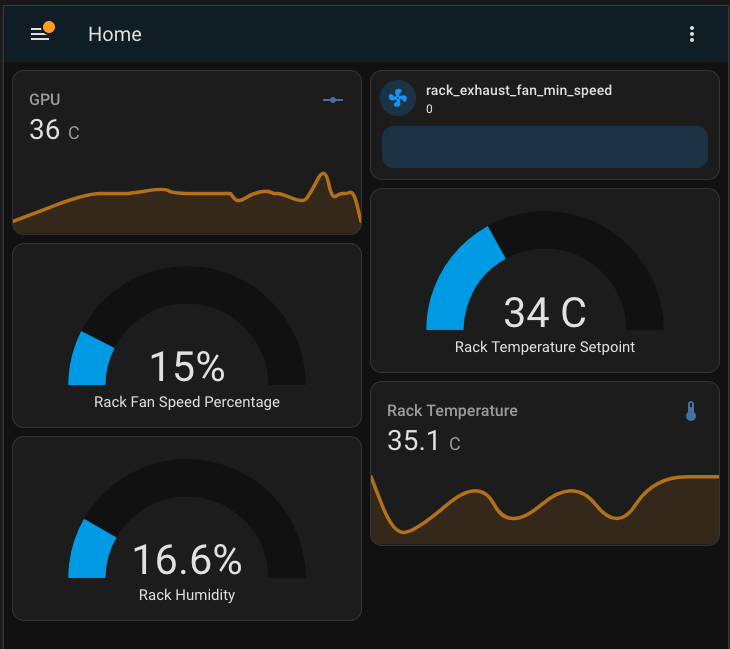 There is going to be a whole post dedicated to the hardware that supports the hardware, so you’ll have to check back if you want to read more about that.
Some other notable services include Paperless-NGX, a document archival tool that scans, tags, and makes searchable all documents you upload. NTFY, a notification service that you can run yourself. I can send push notifications to my phone from any service in the cluster. Mealie, a purpose built recipe management platform where I can save all the recipes I find on the web, and cut out their life story before getting to the actual recipe! Last but certainly not least, my blog! You’re connecting to my homelab right now. I serve this website, MarquesCG.com, and u-the-bomb.com all from my homelab. I think this is the coolest part of the whole homelabbing experience, putting things up on the internet and it all being served from the machines that sit behind me everyday.
The parts we’re missing
Oh boy is there many. Modern cloud providers give you so much in the out-of-the-box K8s offerings that the average user takes for granted. Monitoring alone is such a behemoth that setting it up properly across the cluster could eat a weekend. I’ve got a list here that I’d love to actually get implemented:
- Drive health alerts
- Martha, despite falling victim to this recently, has no external alerts for the SMART health of her drives. I’d be nice to get a bit of a warning other than the GPU jobs failing.
- Aggregated logging / metrics / uptime reporting
- I have prometheus running, and some of my services are set up there but I’m not taking advantage of it to the level I’d like. It would be great to at least have some metrics about the number of visits to my websites that run in the cluster. Integrating InfluxDB + Telegraf
- Recently a token expired in the cluster that is used to pull images from my container repo. This brought down (u-the-bomb.com)[https://u-the-bomb.com] as I was cycling some nodes, and when it tried to pull the container it was met with an
- Centralized Authentication
- Every service has it’s own username and password, and they’re all unique and random. While it’s fine for me with my password manager, I’d love to give my users a central login for services I give them access to, and have a central place to revoke it all.
- Network intrusion detection
- This is something I’m somewhat paranoid about. The last thing I want is someone on my network, snooping around. I’ve done the basic separate VLANs for the cluster and IoT stuff, but it would be great to have something like Suricata actively monitoring. Though that’ll probably just give me a false sense of security.
- A better, auto updating homepage
- I use Dashy right now to list out some services, but they have to be manually added and linked. It would be great to have something the reads the ingress routes in the cluster and builds out the dashboard for each of them.
- This probably should tie into my monitoring dashboard as well, having it all in one place would be great.
- Calibre server
- I use Calibre to manage my books and I run it off my desktop whenever needed, but it would be great to access my books from anywhere without manually ssh’ing through.
- Immich
- A staple of homelabs everywhere, I have photoprism currently running but I’ve not used it a ton as the syncing is difficult. I’ve got to look into immich and see if their syncing is any better / easier
- Backup monitoring
- I use restic and Backblaze to backup my desktop and NFS, but unless run the restic CLI tool to check the state of the backup I have no insight to whether or not it’s failed.
Marvelling at the mundane
The fact that so much of the infrastructure “just works” to the average user is a marvel of engineering. This is just the software. There is the hardware layer beneath supporting all of this, and below that is the physical buildings, A/C units, and power grid. Linus Tech Tips put out a video going through a data center in Toronto and how they keep their systems online. The energy that single facility draws is enough to necessitate coordinating with the hydro providers and switching to generators when the grid is stressed.
I’ve gained a great appreciation for all the work that goes into keeping the internet working. Having a high-density, GPU focused rack could mean each server draws upwards of 4kW, with 4 servers in a single rack. 16kW of cooling for a single rack is an insane amount of power and heat to be dissipating, never mind that it needs to be done for hundreds or thousands of racks. For context, an M3 macbook pro will use somewhere around 50-75w at peak. 1.3%-1.8% the power of a single server, and you can feel it’s warmth heating your lap. You can see why, when the newest generation of chip comes out with 12-15% efficiency, its worth replacing your entire fleet of servers. It’s why I can purchase what was 4 years ago top of the line hardware for a tenth of it’s MSRP.